NeoInfosoft POS logo
POS

Built for Kenyan Businesses

Everything your business needs to run the day.

Sell, manage stock, track customers, take payments and keep your records together — in one system built around how Kenyan businesses actually work.

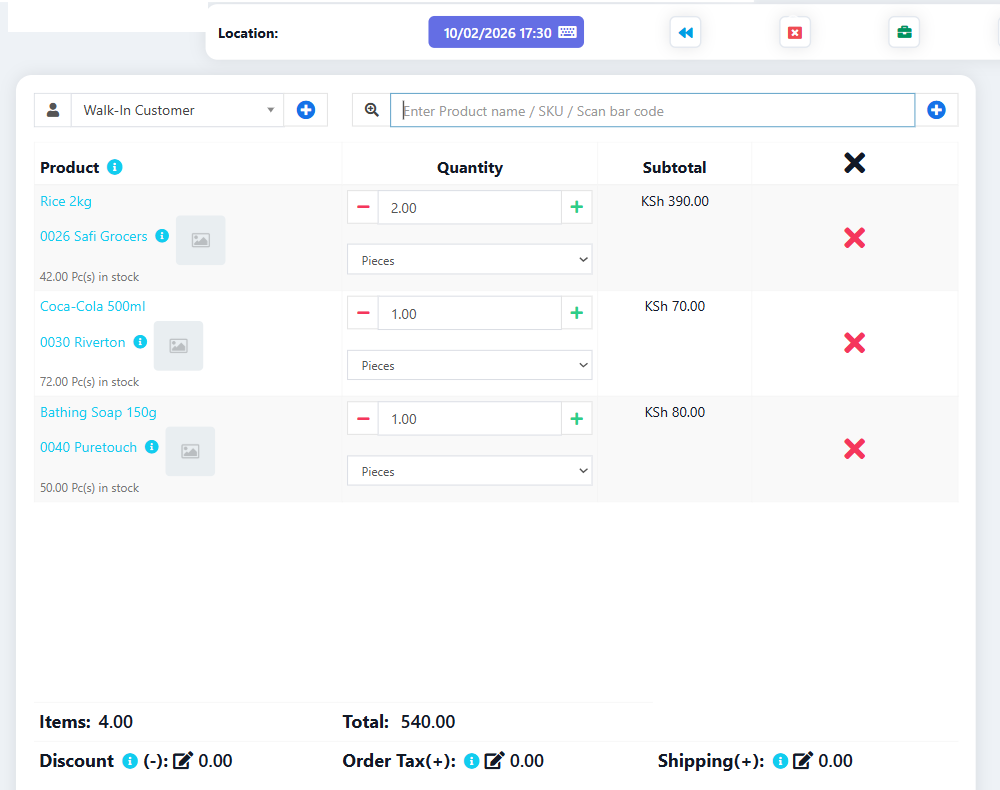
NeoInfosoft POS sales screen showing products, quantities and order total
Point of sale Stock & purchasing Customer ledger Sales & payment reports eTIMS & M-Pesa

All five product chapters are live.

A till your staff can pick up in a morning.

Search the catalogue, build the basket, adjust the lines and take the payment — without making the counter the complicated part of the business.

NeoInfosoft POS
NeoInfosoft POS sales screen showing products, quantities and order total
01

Find the product

Search the way your staff already search. Find products by barcode or SKU, or search the catalogue directly from the point of sale.
02

Build the sale

Keep the basket clear. Adjust quantities and line discounts while the running total stays visible.

03

Keep the workflow moving

Pick up where you left off. Suspend and resume sales when a customer needs to step away, and turn quotations into sales when the order is ready.

04

Finish properly

Issue the right receipt. Choose from the available receipt and invoice layouts, with keyboard shortcuts available for common counter actions.

Know what you hold and what to reorder.

Stock levels, low-stock alerts and purchase records kept together, so reordering is a decision rather than a guess.
NeoInfosoft POS
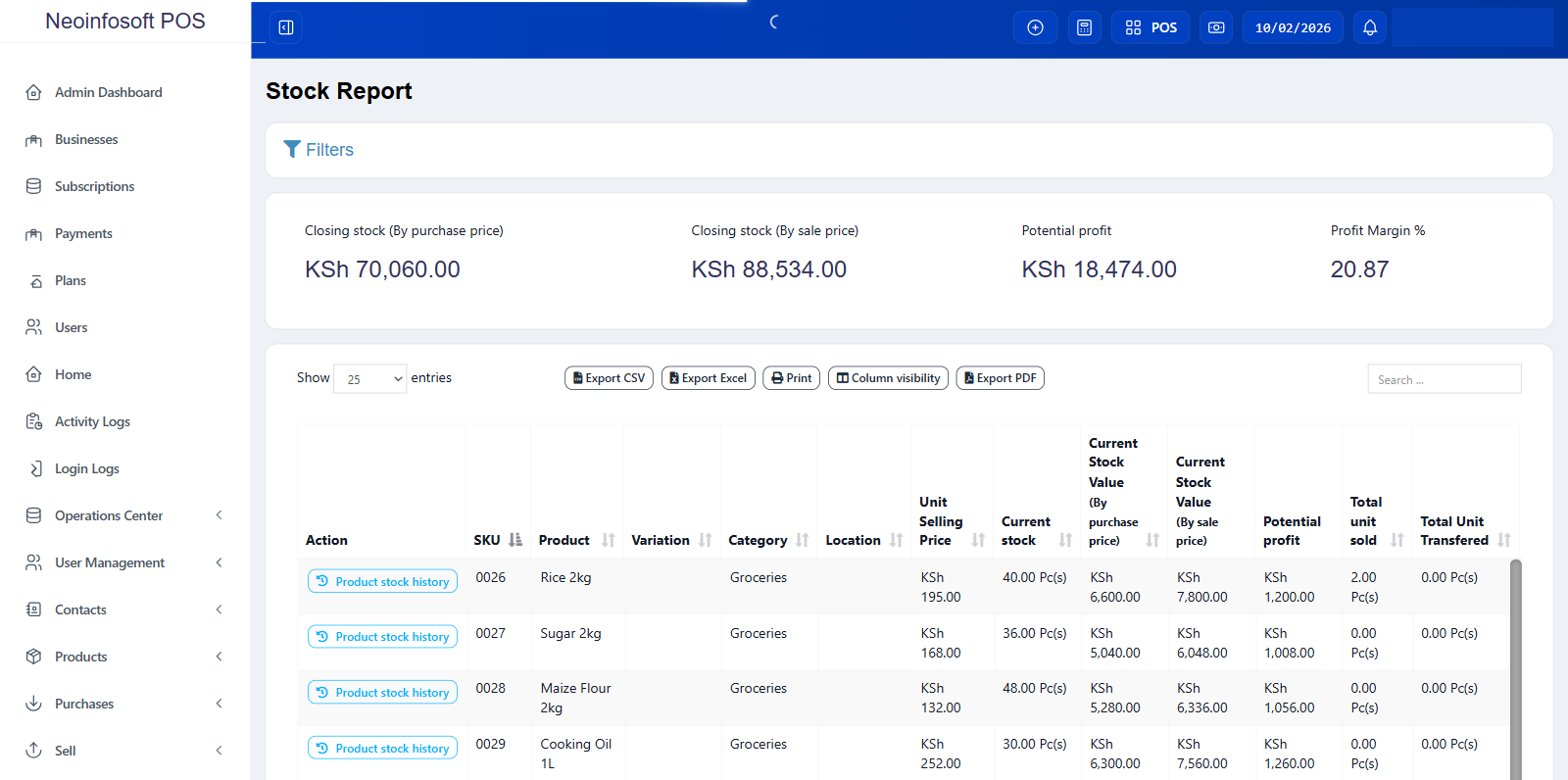
NeoInfosoft stock report showing closing stock totals and a product table with quantities, stock values and potential profit
01

See what is on hand.

Track stock quantities and low-stock levels across your business locations.

02

Keep quantities accurate.

Record stock adjustments and opening stock when the numbers need to change.

03

Move stock where it is needed.

Transfer stock between business locations and manage purchasing from the same system.

04

Keep purchasing organised.

Work with purchase orders, requisitions, returns and supplier records in one place.

Remember your customers, and get paid your way.

Customer records with balances, and every payment method your customers already use.

NeoInfosoft POS
NeoInfosoft POS sales screen showing a product list with quantities and subtotals for each line, and the order total at the bottom
01 Keep the customer record

Know who you are serving.

Keep customer records and groups together with the sales history that belongs to them.

02 Keep credit visible

Know what is outstanding.

Record credit sales, customer balances and ledger activity so amounts due stay visible.

03 Take the payment

Use the payment method that fits.

Record cash, card, cheque, bank transfer and M-Pesa payments against the sale.

04 Close the counter properly

Keep the register accountable.

Open and close the cash register with the opening and closing float recorded as part of the day's workflow.

See how the business is actually doing.

Reports for sales, payments, stock, profit and tax — filterable by date, location and staff.

NeoInfosoft POS
NeoInfosoft POS stock report showing closing stock totals, product quantities, stock values and profit figures
01 Follow the sales

See what is selling.

Review sales and payment reports by date, location and staff so you can see what happened at the counter.

02 Understand the numbers

See the business from more than one angle.

Use purchase, purchase-versus-sales and profit and loss reports to understand revenue, costs and performance.

03 Keep stock visible

Know where the numbers stand.

Review stock and closing-stock reports alongside the sales and purchasing records behind them.

04 Keep control close

Give the right people the right access.

Use roles, permissions and the activity log to control access and keep important actions visible.

Connect the sales workflow to the Kenyan tax and payment tools you use.

eTIMS invoice submission and M-Pesa payments, wired into the same sales flow.

NeoInfosoft POS
NeoInfosoft POS sales screen showing products, quantities and order total
01
Submit the invoice

Keep the tax workflow close to the sale.

Submit invoices through the eTIMS workflow and keep the resulting records connected to the sale.

02
Handle invoice changes

Keep corrections in the same record.

Work with credit and debit notes when an invoice needs to be corrected.

03
Take M-Pesa payments

Keep mobile money in the payment workflow.

Record M-Pesa payments against sales using the available STK and C2B payment flows.

04
Reconcile the record

Keep payments and sales connected.

Review payment records and reconciliation information alongside the sales they belong to.

The everyday tools that round out the workflow.

Smaller capabilities that help keep products, people, purchasing and records organised.

Product & Catalogue

  • Product variants
  • Category & brand management
  • Bulk import/export

Stock & Purchasing

  • Expiry tracking
  • Goods received notes (GRN)
  • Supplier payment tracking

Customers & Expenses

  • Customer statements
  • Loyalty management
  • Expense categorisation
  • Recurring expenses
  • Expense reports

Reporting & Control

  • Custom report builder
  • Commission tracking
  • Shift management

Data

  • Cloud backup

Built around the work your business already does.

NeoInfosoft brings selling, stock, customer payments, reporting and Kenyan tax workflows into one connected system — without asking your team to change how the business works.

One connected workflow

Selling, stock, payments and reporting live in the same system, so the figures in a report trace back to the transactions behind them.

Built for Kenyan operations

Designed around Kenyan business workflows, including eTIMS invoice submission and M-Pesa payment flows.

Clear control over access

Roles and permissions decide what each person can reach, and activity logs keep important actions visible to owners.

Multiple ways to get paid

Cash, card, cheque, bank transfer and M-Pesa can be recorded against a sale, with the register kept accountable for each one.

Works across business locations

Business locations and location-based reporting are supported, with stock transfers available where your plan includes them.

Renew when you choose

Subscriptions do not renew automatically. You renew the current plan from the billing page when you are ready; plan changes are arranged with NeoAfrica Consultants.

Ready when you are

Set up your business and start selling.

Add your products, set up your business and bring selling, stock, payments and reporting into one place.

  • Selling at the till
  • Stock and purchasing
  • Customer payments and credit
  • Sales and payment reporting
  • eTIMS and M-Pesa